
Auto-Tune vs Waves Tune for Vocals (2026 Guide) — Best Choice for Rappers, Singers & Producers

If you record vocals in 2026, you’ve probably asked yourself this question at least once:
“Should I use Auto-Tune or Waves Tune?”
Both plugins can give you clean, modern-sounding vocals for rap, melodic rap, R&B, pop, or even more experimental stuff. They just approach tuning a little differently – in sound, workflow, and price.
In this guide, I’ll break down Auto-Tune vs Waves Tune specifically for rappers, singers, and producers, so you can pick the one that actually fits how you work. I’ll also link to my in-depth breakdown of the latest version:
Read: Auto-Tune 2026 vs Auto-Tune Pro 11 — What’s Really Changed in 2026
Auto-Tune vs Waves Tune — Quick Overview
Auto-Tune is the classic name everyone knows. It’s the sound you hear on artists like T-Pain, Travis Scott, Juice WRLD, The Kid LAROI, and tons of modern melodic rappers and singers. The latest flagship version is Auto-Tune 2026, plus there are other editions available inside Auto-Tune Unlimited.
Waves Tune is Waves Audio’s pitch correction line. It comes in a few flavors:
- Waves Tune Real-Time – low-latency tuning plugin for tracking and live performance.
- Waves Tune – a more detailed, graphical editor for precise pitch and timing corrections.
Both can give you modern tuned vocals. The real question is:
Do you want the classic Auto-Tune sound and ecosystem, or a flexible, often more affordable Waves workflow?
Auto-Tune 2026 — The Modern Standard for Vocal Tuning
Auto-Tune 2026 is the latest evolution of the classic Auto-Tune sound. It’s designed for creators who want clean, musical tuning with as little friction as possible – especially if you’re recording melodic rap, trap, R&B, or emotional vocals.

- Instant real-time tuning with low latency for tracking and performance.
- Modern, clean interface that’s easy for beginners to understand.
- Flex-Tune & Humanize to keep things natural when you don’t want the robotic effect.
- Classic Mode for that iconic “hard-tune” sound on hooks and ad-libs.
- Powerful Pro-level options when paired with Auto-Tune Pro / Graph Mode inside Auto-Tune Unlimited.
If you want the exact sound people think of when they say “Auto-Tune,” this is the lane. It’s also the plugin most tutorials reference, which makes it easier to learn if you’re just starting out.
Try Auto-Tune with a 14-Day Free Trial from Antares
Waves Tune & Waves Tune Real-Time — Flexible and Budget-Friendly
Waves Tune takes a slightly different approach. Instead of one main plugin, Waves splits things into:
- Waves Tune Real-Time – similar to Auto-Tune in “auto” mode. Great for real-time vocal tracking, live streaming, and performance.
- Waves Tune (graphical version) – more of a detailed editor, where you can see the notes, draw in changes, and correct timing or vibrato by hand.
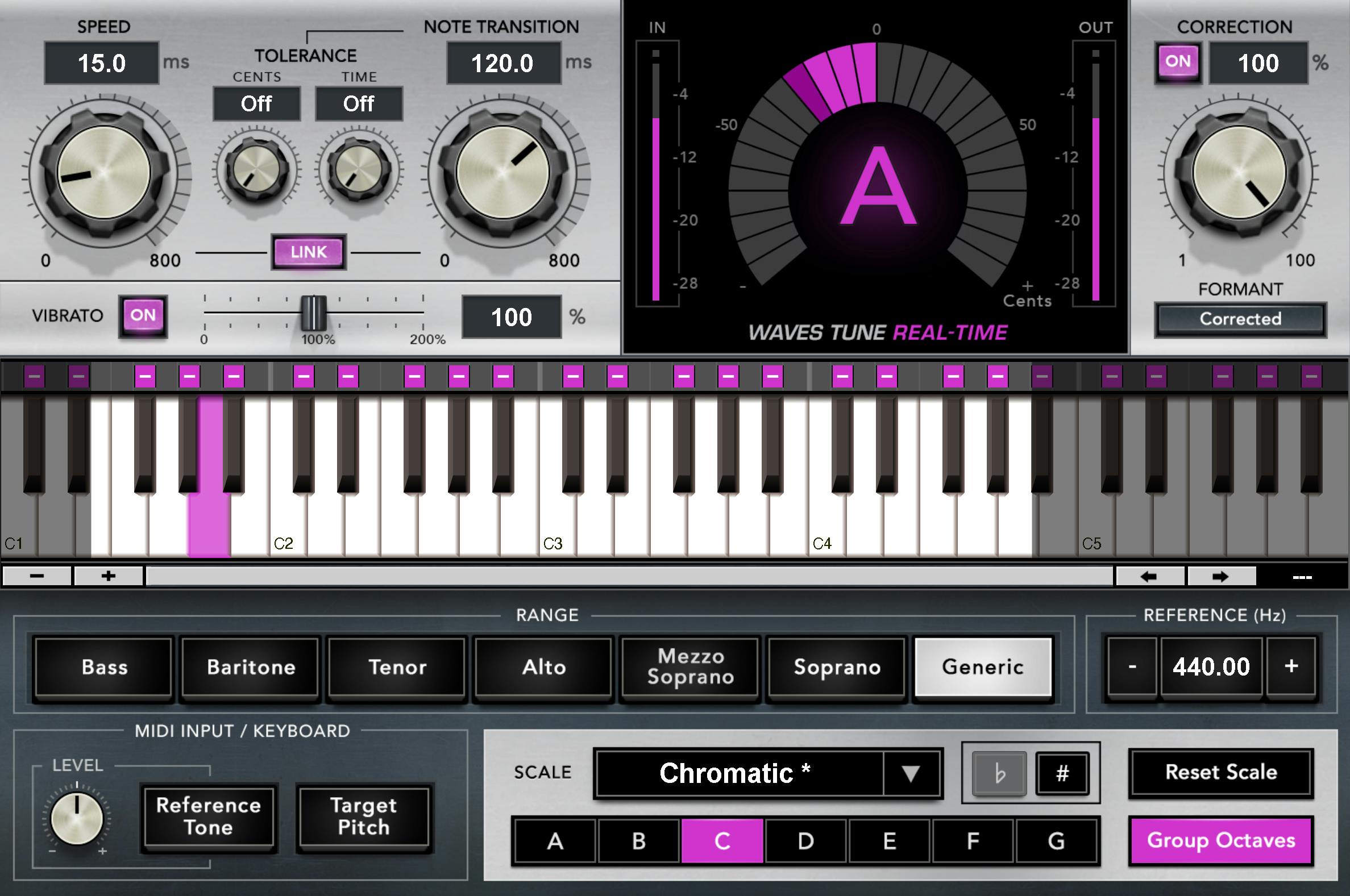
Some reasons a lot of artists and engineers like Waves Tune:
- Affordable pricing – Waves runs frequent sales and bundles.
- Clean, subtle sound – especially good when you don’t want the tuning to be obvious.
- Good CPU performance – especially Waves Tune Real-Time.
- Works great alongside other Waves plugins you might already be using for EQ, compression, and effects.
If you’re on a budget or already deep into the Waves ecosystem, Waves Tune can cover a lot of ground without needing a full Auto-Tune Unlimited subscription.
Check out Waves Tune & Waves Tune Real-Time (Free Trial & Deals)
Auto-Tune vs Waves Tune — How Do They Sound on Vocals?
In terms of raw sound, both plugins can get you to a professional result. The differences are more about character and how aggressive you want the effect to be.
- Auto-Tune – slightly more “recognizable” when pushed hard. It’s the signature sound of a lot of modern melodic rap and pop. When you crank the Retune Speed and lower Flex-Tune, you get that familiar, dramatic tuning effect.
- Waves Tune – often feels a bit more transparent and subtle. You can push it, but a lot of people use it for natural correction instead of obvious robotic effects.
For melodic rap hooks, emotional auto-tuned verses, and ad-libs, most artists still lean toward Auto-Tune because that’s the reference they grew up hearing.
For clean pop vocals, R&B leads, or detailed mix work, Waves Tune (especially the graphical editor) holds its own and can sound extremely natural.
Workflow & CPU — Which One Is Easier to Use?
If you’re just starting out with vocal tuning, workflow matters as much as sound.
- Auto-Tune 2026 – very fast to set up: pick your key, scale, input type (Soprano, Alto/Tenor, etc.), then adjust Retune Speed, Flex-Tune, and Humanize. Great if you move quickly and don’t want to overthink it.
- Waves Tune Real-Time – similar “set-and-forget” approach. You choose key/scale, speed, and correction range. It’s easy to drop on an insert and go.
- Waves Tune (graph editor) – deeper, but more steps. You usually have to play the section so it captures audio, then edit notes after. More precise, but slower.
In terms of CPU:
- Auto-Tune 2026 – optimized and efficient for modern systems, but still a serious plugin.
- Waves Tune Real-Time – generally very light on CPU and good for stacking multiple instances.
- Waves Tune (graph) – a bit heavier, but usually used on fewer tracks for surgical work.

Pricing & Bundles in 2026
Pricing changes with sales and promos, but here’s the general idea:
- Auto-Tune – most people now get it through Auto-Tune Unlimited, which includes Auto-Tune 2026, Auto-Tune Pro, and a full suite of Antares plugins for a subscription price. There are also perpetual licenses for specific versions.
- Waves Tune – Waves usually sells Waves Tune and Waves Tune Real-Time as individual plugins or in bundles, and they frequently run discounts. That makes them attractive if you want to own a plugin outright at a lower cost.
If you want the full Auto-Tune experience with every edition, the subscription route makes a lot of sense. If you just need a solid tuner and want to spend less upfront, Waves is often the more budget-friendly option.
Start a 14-Day Auto-Tune Trial | Explore Waves Tune Deals
Auto-Tune vs Waves Tune — Quick Comparison
| Feature | Auto-Tune 2026 | Waves Tune / Waves Tune Real-Time |
|---|---|---|
| Overall Sound | Recognizable modern Auto-Tune character | Clean, transparent correction |
| Best For | Melodic rap, trap, pop, R&B hooks | Natural vocal correction, budget-conscious setups |
| Workflow | Fast, real-time, creator-focused | Real-Time = fast; Waves Tune = detailed, slower |
| Advanced Editing | Graph Mode inside Auto-Tune Pro | Graphical editor in Waves Tune |
| CPU Usage | Optimized, but full-featured | Real-Time is very light; Tune is moderate |
| Pricing | Subscription (Auto-Tune Unlimited) or higher-cost perpetual | Lower individual prices; frequent sales |
In short, Auto-Tune 2026 is the go-to if you want that Auto-Tune sound and a tight, modern workflow. Waves Tune is a great alternative if you want something a little more transparent, flexible, and usually easier on the wallet.

Which One Is Best for Rappers & Melodic Rap?
If you’re making melodic rap, emo rap, trap, or country rap-type music, Auto-Tune is usually going to feel more familiar right away.
- Auto-Tune makes it easy to dial in heavy, expressive tuning for hooks.
- Most presets, tutorials, and reference settings on the internet are built around Auto-Tune.
- The sound people expect from modern melodic rap is often directly tied to Auto-Tune’s response curve.
Waves Tune Real-Time can absolutely work for this style too – especially if you’re already using a Waves-heavy vocal chain. But if you want the exact feel of the artists you’ve grown up listening to, Auto-Tune usually gets you there faster.
Which One Is Best for Singers, Mixers & Engineers?
For singers, vocal producers, and mixing engineers who want control:
- Auto-Tune Pro (Graph Mode) and Waves Tune are both strong options.
- They both let you see the performance, move notes, adjust timing, and shape vibrato.
- Waves Tune is often a bit cheaper and still very capable for detailed tuning inside a mix.
The choice here is mostly about ecosystem:
- If you’re all-in on Antares and want the latest Auto-Tune features, go with Auto-Tune Unlimited.
- If you’re heavily invested in Waves bundles and plugins, Waves Tune fits naturally into that setup.
So… Which One Should You Get?
Here’s the simple breakdown:
- If you want the classic melodic rap / modern tuned sound: Start with Auto-Tune.
- If you’re on a tighter budget or already have Waves plugins: Go with Waves Tune Real-Time or Waves Tune.
- If you’re a mixer doing detailed tuning: Use Auto-Tune Pro Graph Mode or Waves Tune for surgical edits.
You really can’t go wrong with either. The most important thing is to pick one, learn it deeply, and build a vocal chain you trust.
Try Auto-Tune Free for 14 Days | Explore Waves Tune & Waves Tune Real-Time
Hear How I Use Pitch Correction in My Own Music
I’m Dylan Droll — an artist, recording engineer, and creator originally from Louisiana and now based in Florida. I make melodic, emotional rap and help other independent artists get better-sounding vocals from home studios and small setups.
If you want to hear how I use tuning (Auto-Tune and Waves) in real songs, start here:

Tools I Recommend for Recording & Releasing Music
These are some of the tools I use and recommend for home studio artists. A few of these links help support the blog at no extra cost and keep articles like this free for independent creators.
- Auto-Tune — 14-Day Free Trial from Antares
- Waves Plugins & Waves Tune — Free Trials & Deals
- BandLab Membership — DAW, Mastering & Creator Tools
- My Recommended Amazon Home Studio Gear List
- CapCut Pro — My Go-To for Mobile Video Editing
- DistroKid — Release Your Music on All Platforms
- Amazon Music — 3-Month Free Trial
Join the Calling Home Records Community
- Join the Calling Home Records Discord — connect with artists, producers, and engineers building something different.
- Work with me — Mixing, Mastering & Vocal Production
Thanks for reading. If this helped you decide between Auto-Tune and Waves Tune, share it with another artist or producer who’s trying to level up their vocal sound. Keep creating — the world really does need what you make!