What Is [untitled]? A Music App for Demos, Beats, and Unfinished Songs
This post contains referral links. I may receive referral benefits if you sign up through them.
You export a song, send it to your phone, and listen again later. By the next week, there are three mixes in your messages, another bounce in your downloads, and a voice memo you meant to come back to. Finding the version you wanted starts taking longer than listening to it.
[untitled] is built around organizing, listening to, and sharing work-in-progress music. It’s also a place to try a different tempo, save an alternate version, or give people a way to hear your demos and beats. If you produce music, you can use projects to show artists what you make and offer paid access to selected work.
Explore [untitled] with my referral link →
What Does [untitled] Do?
The app lets you arrange tracks into projects and folders, share listening links, and revisit your music across supported devices. You can replace the audio on an existing track and keep access to its version history. That helps a developing song stay together as the recording changes.
I like having one place to go back and listen. Sometimes I’m checking a new mix. Other times I’m hearing an older idea again and realizing there’s something in it I want to finish.
Try a Different Tempo and Save Another Version
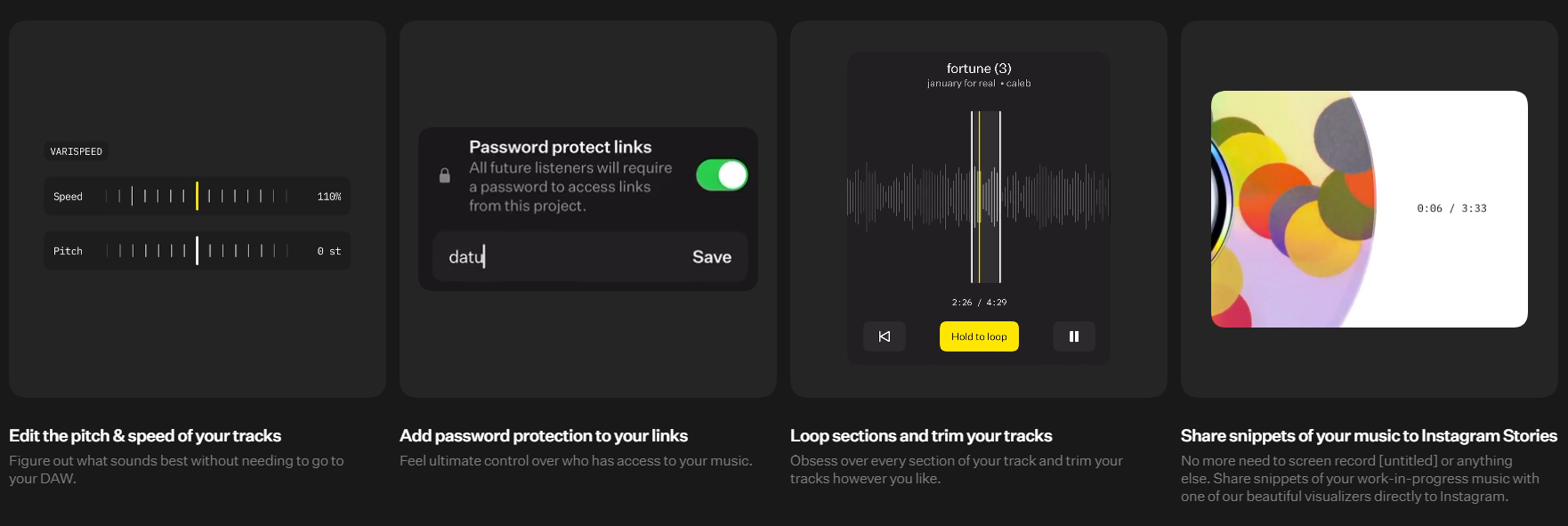
One of my favorite features is being able to speed up or slow down a track without reopening Pro Tools. If I want to hear how a different tempo changes the feel, I can try that first. When I want the pitch to move with the speed, I use varispeed. If I like the result, I can save the edit as another version and keep the original to compare.
A little more speed can make a hook feel different. Slowing it down can give the words more room. Since I already put out sped-up and slowed versions of some of my songs, I like having a way to hear where an idea could go before deciding whether to make it part of a release.
Buy or Sell Access to Projects and Beats
With Paid Projects, artists and producers can charge for access to a project. That could be one beat, a collection of instrumentals, or a project that includes stems. As a buyer, check what’s included. If you plan to record over a beat and release the song, ask the producer what usage terms come with it.
For producers, I see a bigger opportunity here than just sending a payment link. You can put a few beats together that sound like you and send one project to an artist who might connect with that sound. Someone might come for one beat and hear another they want to write to. If there’s a project you’re ready to sell, you can offer paid access there too.
Publish to the Feed and Find Your Community
If the public feed is available in your app, you can publish a project you’re ready for other people to hear. For an artist, that might be a demo or an alternate version. For a producer, it might be a short beat tape that shows the kind of music you want to make with people.
I like the idea of giving listeners a reason to come back while a song is still taking shape. You can also explore other artists’ projects and find people whose music you’d want to hear more of or work on together. For producers looking to grow an audience, that gives the app a role beyond storing beats and sending them privately.
Where It Fits in an Artist’s Process
- Early ideas: group rough recordings and beats so you can find them when you’re ready to work.
- Developing songs: keep relevant bounces together and audition alternate edits as you work through arrangement and performance choices.
- Feedback: share the right project with the people helping you finish it.
- Listening away from the session: give yourself space to hear the song without watching the session move.
That last part matters to me. I can spend an evening adjusting a vocal and lose track of whether the song still makes me feel anything. Listening away from the session brings me back to the performance, the words, and the arrangement.
A Simple Project Structure to Start With
Try three groups called Ideas, In Progress, and Ready for Review. Keep the system small enough that you’ll maintain it after a long session.
Inside a song project, give bounces a date and a useful description. A name like 2026-11-02 — vocal quieter tells you more than “final final new.” If you’re testing a tempo or varispeed edit, name it clearly so you can pull up both versions later and hear which one fits.
Free Access and [membership]
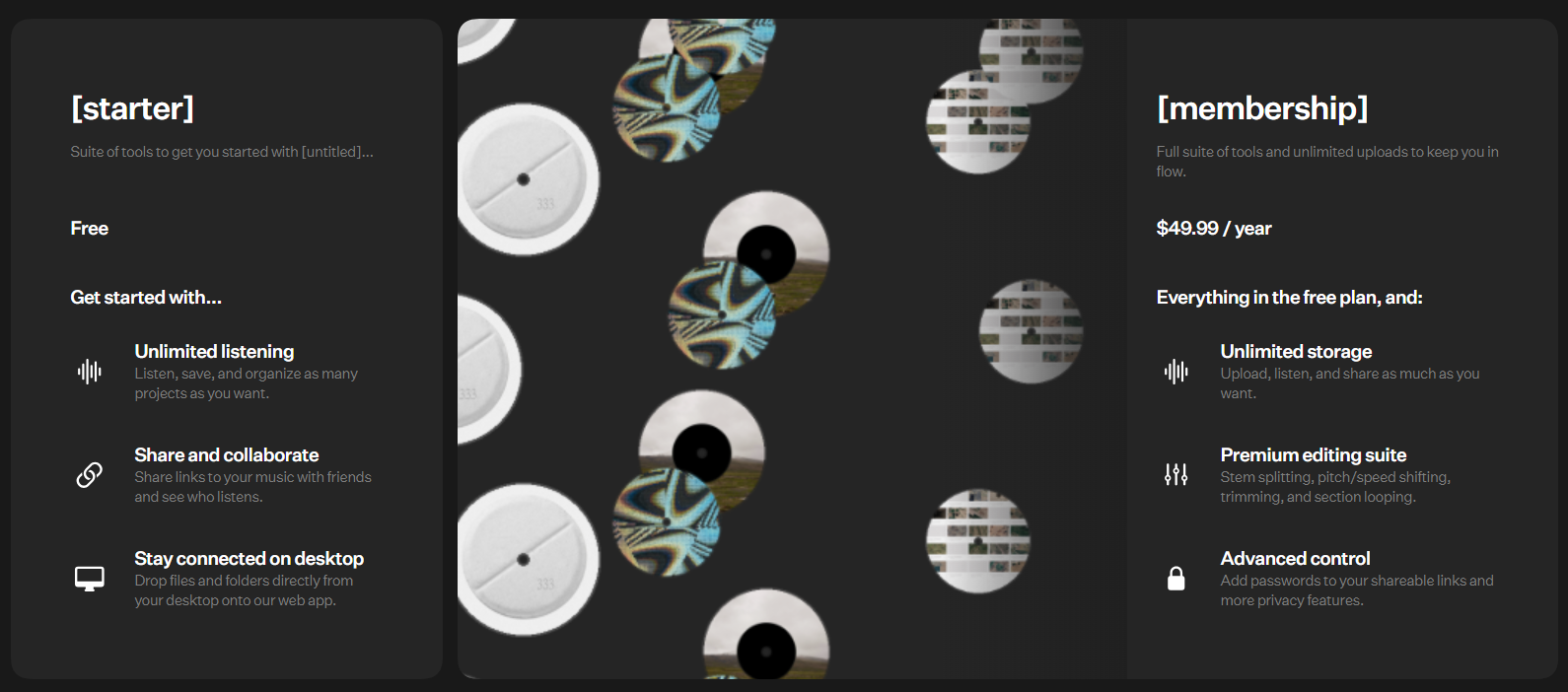
The [untitled] plan page lists a free [starter] plan and paid [membership]. It lists unlimited storage and additional editing and privacy tools under [membership], including pitch and speed shifting. Check the current plan details for the features you want to use.
How This Connects to My Music
With music like “Every Time We Sing” and “Phases”, the vocal and the feeling have to carry the song. When I’m listening back, I’m paying attention to whether the words come through and whether the performance still connects.
That’s also what I’d listen for in an alternate edit. A faster version might give the performance more energy. A slower version might make a line land differently. I want to hear what the change does to the song before I decide which version to keep.

Is [untitled] Worth Looking At?
I’d try it if your demos are scattered across devices, you regularly share bounces with collaborators, or you want to experiment with alternate versions on your phone. If you produce beats, I’d start with a project that represents your sound and see how it works as something you can send to artists or share with listeners.
Try [untitled] with My Referral Code
My [untitled] invitation offers one free month of [membership] with code Q3RTUEV7. Check the offer’s eligibility, renewal price, and billing terms before activating it.
Hear the Music Behind These Guides
I’m Dylan Droll, an acoustic rap artist and mixing engineer. If you want to hear the kind of vocal-led music behind these articles, listen to “Every Time We Sing” and “Phases” on the streaming platform you use. You can also explore my This Is Acoustic Rap playlist below.
New here? Find my music on Spotify, Apple Music, and more through dylandroll.com/links.
Keep in touch: Join my mailing list using the form on my music page for recording tips, music tools, and new releases.