
How Loud Should Vocals Be in a Mix? (Pro Tools Tips for Beginners)
If your vocals are too quiet, they get lost. Too loud, and they overwhelm the track. So what’s the sweet spot? That question used to drive me crazy when I first started recording music at home. Over the years, using Pro Tools and Waves Audio plugins, I’ve developed a go-to system for getting my vocals to sit just right—clean, upfront, and professional-sounding.
Why Vocal Volume Is So Important
The vocal is usually the focal point of your mix—especially in hip hop, melodic rap, or pop music. If your levels are off, people notice. A good vocal mix feels balanced and emotional, and it should sound just as clear on headphones as it does in the car or on a Bluetooth speaker.
That’s why learning how loud vocals should be in your mix isn’t just a technical question—it’s a creative one, too.

How Loud Should Vocals Be in a Mix?
There’s no one-size-fits-all answer, but here’s a general rule of thumb:
- Raw recorded vocals: Aim for peaks between –18 dBFS and –12 dBFS.
- Processed vocals (after EQ, compression, etc): Sit them between –6 dBFS and –3 dBFS on the master bus.
- Final mix loudness: For most modern songs, a vocal LUFS around –14 to –10 integrated works well, but context matters.
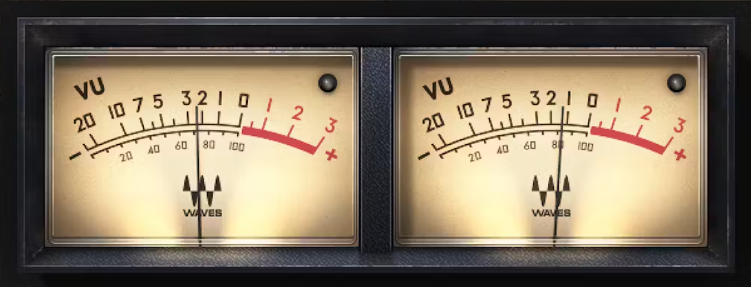
Instead of just eyeballing the meters, try using a VU meter, RMS readouts, or LUFS metering to get more accurate feedback on how your vocals are sitting in the mix.
How to Measure Vocal Loudness in Pro Tools
If you’re working in Pro Tools, you’ve got a few solid tools to measure your levels:
- Use the built-in “Master Fader” to monitor peaks.
- Add a VU or RMS meter plugin for average loudness. I like the Waves VU Meter or Dorrough Meter.
- Set up a reference track (with vocals you admire) and compare visually and by ear.
Best Waves Plugins for Leveling Vocals
Waves Audio makes it easy to control vocal levels even if you’re not a pro yet. Here are a few go-to plugins I use regularly:
- Vocal Rider — Automatically rides the vocal to stay balanced in real time. Huge time saver!
- CLA Vocals — A great all-in-one plugin that compresses and enhances presence.
- R-Vox — Simple but powerful compressor with an intuitive interface.
You can try any of these for free with the Waves Creative Access subscription trial.

How I Personally Set Vocal Levels
Here’s my real-world approach: I record at –15 dBFS peaks, gain stage around –12 dBFS after basic EQ and compression, and then use Vocal Rider to keep everything smooth before hitting the master bus. I’ll usually bounce rough mixes that peak around –3 dBFS, which gives plenty of headroom for mastering.
Every session is a little different, but once you’ve built a solid vocal template in Pro Tools, this process becomes second nature. If you want a jump start, I offer custom templates and vocal chains designed for Pro Tools + Waves.

Real Example: How I Mixed Vocals on My Song “Almost”
If you want to hear all of this in action, check out my song “Almost”. I recorded and mixed it entirely in Pro Tools using Waves plugins like R-Vox, Vocal Rider, and the CLA-2A style compressor to get that emotional, upfront vocal sound.
The track starts off soft and vulnerable, but I needed the vocals to cut through the heavy 808s and atmospheric sample. I used automation and parallel compression to keep the vocal consistent—especially during the hook, which hits way harder when the vocal stays tight around –6 dBFS.
You can listen to “Almost” on YouTube or hear it in my Spotify playlist featuring other songs I’ve mixed.
Tips for Mixing Vocals That Sit Just Right
- Use reference tracks — don’t guess.
- Mix in mono first to check balance.
- Turn your speakers low to see what still cuts through.
- Don’t rely on visual meters alone—trust your ears.
Helpful Resources to Start With
If you want to dial in better vocal levels, or just build your first recording template the right way, here are some free tools to get you started:
- 🎛️ Start Your Pro Tools Free Trial
- 🎚️ Try Waves Audio Plugins for Free
- 🎙️ Recommended Home Studio Gear (Amazon Storefront)
- 🛠️ Work With Me — Custom Templates, Vocal Chains & More
Feel free to connect with me on Instagram if you’ve got questions about vocal mixing or want help building your own Pro Tools setup.
🎓 Bonus for Students & Young Creators
Eligible students and young adults (ages 18–24) can now sign up for Amazon Prime Student with a 6-month $0 trial. After that, it’s just 50% off the normal membership. You’ll get:
- 🛍️ 5% limited-time cash back on gear, clothes, and essentials
- 🔥 Access to exclusive Prime Day drops + bonus savings
- 🎥 Prime Video, Grubhub+, fast shipping & more
👉 Start Your 6-Month $0 Trial Here and take full advantage this Prime Day—especially if you're upgrading your studio or shopping for new plugins.